RobloxQuest event

The Hunt: Roblox 20 Wiki

Twenty historical years. One chronological anniversary journey.

The Hunt: Roblox 20 links featured-game quests through an anniversary hub. Start in Year Zero, complete each historical stop, and return for the next year and avatar item. Finish all twenty years to reach Year Infinity.

Developer
Roblox Presents
Experience created
Sep 14, 2026
Visits
77,383,351
Approval
81.6% (23,444 votes)
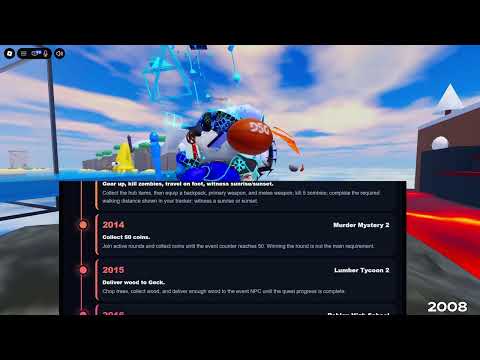
See the anniversary event in motionCreator footage supplies visual context; live quest instructions determine your next task.Walkthrough
Game type
Anniversary quest hub
Max players
30
Devices
PC, Mobile
Guide classification
Adventure / Quest event
Snapshot reviewed
Sep 18, 2026

Independent fan guide. Roblox and Roblox Presents own the event; this site does not operate the game.

Start here

The Hunt Roblox 20 Beginner Guide: Your First Registered Year

Make the first session one verifiable loop: enter the official anniversary experience, follow Year Zero, complete the available historical task, and inspect the hub on return. A recognized year is a more useful checkpoint than several games merely visited.

First-session result Finish the anniversary objective and confirm that the next historical year is available. If either result is unclear, record that exact handoff.

Keep two observations togetherNote the destination entered and the year presented afterward. This small record makes a session easier to resume.

  1. Enter the anniversary experience

    Before your first quest

    • Use the official Roblox link and confirm that you joined The Hunt: Roblox 20, rather than a similarly named experience.
    • Follow Year Zero and note the historical destination currently offered. Later direct game visits should not be mistaken for registered progression.
  2. Follow the anniversary objective

    Inside the featured experience

    • Read the event-specific task presented there. Ordinary game progress can be useful context but does not prove that the anniversary objective has finished.
    • Inspect the event completion result before leaving. If an action remains, continue the task; entry alone does not establish a finished year.
  3. Return and compare the next year

    After the event task

    • Return to the anniversary hub and inspect the route. The official loop connects a completed quest with the next year and an exclusive avatar item.
    • If the next year is unclear, compare the finished objective with your recorded destination. Diagnose that transition before replaying unrelated activities.
Access and progress differ

PC and mobile are supported, but participating-game availability can vary by region. Keep the exact join message when entry fails; it identifies a different obstacle from a task that remains unfinished.

First-loop walkthrough
Verified availability

The Hunt Roblox 20 Codes

No active redemption code has been verified in the reviewed sources. Historical avatar rewards are earned through featured quests and hub progression; an item name or an older Hunt string is not evidence of a current code.

Code source review
No verified active strings

Check the source before trying a code

The empty list reports verification status. It does not prove that a redemption feature cannot exist, and it does not establish a menu location. Use the four checks below before treating a newly circulated string as usable.

Identify the event

Confirm that the announcement names this 2026 anniversary experience. A string associated only with an earlier Hunt has a different publication context.

Keep the exact string

A reward title, badge name, or video headline cannot substitute for the literal code. Look for an explicitly published value rather than deriving one.

Read redemption context

Use the stated interface and conditions if a current source supplies them. No universal menu path has been established in this review.

Separate earned items

A historical avatar item follows the quest-and-hub route. Diagnose that acquisition in Rewards instead of repeatedly testing an unrelated string.

Check later official announcements

Open the official event information for an explicit new release. This link is a source-check action; the site does not send account notifications.

Official event FAQ
Editorial comparison

The Hunt Roblox 20 Tier List: Quest Preparation Clarity

Compare four quests as an unfamiliar visitor preparing for a required stop. Grades describe preparation clarity, not combat strength, completion speed, or an official competition result.

Site-authored gradesOne shared preparation question

This non-official comparison weighs task interpretation, travel, and handling risk across four documented quests. It cannot replace the chronological order.

  • Clarity of the next objective
  • Travel and delivery preparation
  • Risk while handling the objective
GradeFeatured questTask structurePreparation decision
S
Adopt Me!Egg care
Task structure
  • The Throwback Egg supplies a needs-led care target.
  • Each displayed need gives the player a concrete next action.
Preparation decision

If you already understand pet care, keep the event egg active and follow its needs; verify its hatch before leaving.

A
Lumber Tycoon 2Wood delivery
Task structure
  • Geck gives a focused material-delivery objective.
  • Reading the live request can prevent cutting unsuitable wood.
Preparation decision

Before gathering, inspect Geck’s current request. Continue only when your prepared delivery matches the material he asks for.

B
JailbreakFive rescues
Task structure
  • Named targets permit a finite rescue checklist.
  • The route crosses landmarks, a roof, and the prison interior.
Preparation decision

If travel is unfamiliar, mark each rescue separately and plan roof access before departure; finish when all five are accounted for.

C
Grow a GardenCrop submissions
Task structure
  • The objective specifies 50 crop submissions.
  • Owl sleeping state and carrying slowdown affect return handling.
Preparation decision

If carrying makes the route unreliable, rehearse the island approach first; track Sam’s submission result instead of inventory quantity alone.

All required years remain chronological. A lower preparation grade is a reason to plan, not permission to skip a year.

Prepare a later stop

The Hunt Roblox 20 Quests: Prepare for Different Objective Types

Prepare the objective for your current year. Care, wood delivery, rescues, and crop submissions require different plans; ordinary gameplay familiarity does not establish the anniversary task.

Translate the objective into a useful plan

Identify the action that produces completion.

  1. 1

    Use needs for the Throwback Egg

    Keep the Throwback Egg active in Adopt Me! and follow its displayed needs. Care of another pet does not establish this objective. Inspect the event egg’s hatch before leaving.

    Care targetThe event egg is the target whose hatch you are pursuing.
  2. 2

    Read Geck before cutting

    Inspect Geck’s live request in Lumber Tycoon 2 before cutting. Get type and quantity from the NPC rather than an unsupported fixed amount. Deliver matching wood and inspect his response.

    Delivery matchYour gathered wood answers the request currently presented by Geck.
  3. 3

    Make Jailbreak a five-name checklist

    Start with the Prison Yard event Noob. Account for Kreekcraft, DenisDaily, Maplestick, Jane Doe, and Guest 417 across the Donut Shop, Jewelry Store roof, Train Station, Museum, and prison interior. Plan roof access separately.

    Rescues accounted forEach of the five named targets has its own recorded result.
  4. 4

    Plan the Owl Island return before carrying

    Grow a Garden requires 50 crop submissions to Sam at Tree Island. Carrying slows movement, and the Wise Owl’s sleeping state matters. Inspect the approach first and track submitted crops rather than inventory quantity.

    Submission resultSam’s objective reflects the required crop delivery.
Find the blocked transition

The Hunt Roblox 20 Hub: Diagnose a Portal or Year Handoff

Diagnose the transition you reached: destination access, an unfinished anniversary objective, or an unavailable next year after return. Replaying unrelated activities cannot distinguish these observations.

The destination will not open

Roblox displays an access message before the featured task loads.

What this may meanDestination access may be the issue. PC and mobile are supported, but participating-game availability can vary by region. Keep the message before assuming missing progression.

Check 1
Record the exact message, destination, device, and time. Confirm that you are trying the year currently offered by the hub.
Check 2
Use the Roblox message to choose the next access check. Do not mark the year complete merely because the portal was selected.

The game still asks for an objective

You reached the featured game, but its anniversary instruction still identifies an unfinished action.

What this may meanEntry and ordinary gameplay do not establish anniversary completion. An active instruction points to a task checkpoint inside the destination.

Check 1
Read the remaining anniversary instruction and finish the action it identifies. Compare it with the objective guide for that game.
Check 2
Look for the event completion result before leaving. A generic activity reward is insufficient evidence for this handoff.

The next year remains unavailable after return

The featured task finished, but the next historical stop is unavailable after return.

What this may meanThe finished objective and inspected hub stage may disagree. No universal waiting interval or guaranteed reset procedure is established.

Check 1
Compare the year and destination recorded before departure with the anniversary completion result. Check the next-year state in the same event hub.
Check 2
Keep the task and hub observations for support context; avoid blindly replaying unrelated years.
Identify the avatar item

The Hunt Roblox 20 Rewards: Match the Item to Its Quest

Match the exact avatar-item name to its historical task. These examples distinguish hub rewards from game-only possessions, so an inventory search answers the ownership question you intended.

A Bandit’s BandanaHistorical avatar rewardJailbreak · 2017Complete the five-target anniversary rescue objective, then follow the historical hub reward handoff. Keep the named item distinct from the game-specific extra.Guest 417 Wing is an in-game spoiler. Its presence does not substitute for ownership of the avatar bandana.
Grown From a GardenHistorical avatar rewardGrow a Garden · 2025Finish Sam’s 50-crop objective and check the chronological hub route. A direct late-game visit alone does not establish the preceding historical requirements.The Chilli Mango seed is an in-game outcome. Search the avatar-item name separately when checking the historical reward.
Leather Adventure BackpackHistorical avatar rewardLumber Tycoon 2 · 2015Finish Geck’s wood-delivery request and inspect the hub result. The completion badge is named You helped Geck!, while the avatar item has its own identity.Look for the backpack in avatar ownership. Wood remaining in the game inventory cannot establish that this item was acquired.
The KittyKånkaHistorical avatar rewardAdopt Me! · 2019Complete the Throwback Egg care-and-hatch objective, then inspect the anniversary hub flow. Caring for a different pet does not identify this acquisition.Search ownership for this backpack name. The hatched event pet and the Roblox avatar item are different possessions.
Check second-phase access

The Hunt Roblox 20 Year Infinity: Understand the Unlock Dependency

Year Infinity adds twenty games representing 2026 and beyond after all twenty historical years are complete. A single finished quest or direct game visit cannot establish that full-route dependency.

Keep the two rosters separate

The historical roster assigns stops to 2006–2025. Year Infinity adds twenty games from 2026 and beyond. An event-year assignment does not establish a release date or a second-phase task.

Historical route
Scope
2006–2025 · twenty years
Role
Complete the prerequisite journey
Year Infinity
Scope
2026 and beyond · twenty additional games
Role
Enter the second event phase
Roster conclusionUse the live second-phase destinations for the second-phase list.

A phase unlock is a full-route result

Review the chronological hub route for full historical completion. Familiarity with later games does not satisfy earlier years, and no subscription shortcut is established.

Current historical questNext historical year

Complete its anniversary objective and verify the return.

All twenty historical years completeYear Infinity

Inspect the second-phase access presented by the hub.

Unlock conclusionFull historical completion is the announced access condition.

Read the destinations actually presented

After the historical dependency is recognized, inspect the Year Infinity destination and read its live game and objective information.

No fully verified second-phase roster or uniform task formula is available here. Do not import historical names, infer costs, or promise identical rewards. Read the live destination and its own objective.

Next decisionChoose a currently presented game with an explicit objective.
Read the benefit condition

The Hunt Roblox 20 Plus: Check What Subscription Status Changes

Match your account question to the benefit condition. Temporary theme access, post-event retention, earned items, and launch-day entry have different scopes. Subscription alone does not establish item ownership.

You want the Classic theme during the event

All players can use the temporary Classic logo, colors, and font during the event through a device toggle. Inspect Roblox app appearance rather than a featured game’s custom interface.

  • Compare the same app screen before and after the device control, if presented.
  • Record the device and interface if no control appears.

You want to keep the theme afterward

Active Plus subscribers can retain the Classic theme afterward. This concerns ongoing subscriber status, distinct from temporary access for everyone and from historical quest completion.

  • Check the event window and active Plus status afterward.
  • Compare the same app screen rather than unrelated game interfaces.

You expect subscriber items to appear automatically

Extras include a Classic avatar background and profile frame, plus the chance to earn three exclusive virtual items. Appearance extras and earned-item acquisition are separate outcomes.

  • Inspect the live instruction for the particular earned item you are pursuing.
  • Check ownership separately from subscriber status.

You are comparing launch-day entry times

Plus early hub entry began September 17 at 9 AM PT; public opening was 3 PM PT. This launch-day window does not prove all quests opened early or bypass historical prerequisites.

  • Attach Pacific Time and the launch date when interpreting an early-access claim.
Event scope

The Hunt Roblox 20 Quick Questions

Is this an official event website?

No. Roblox and Roblox Presents operate the official event, purchases, and account support. Check official instructions when this independent guide differs.

What is the public event window?

September 17, 2026 at 3 PM PT through September 28 at 10 AM PT. Keep the hour and Pacific Time context when converting locally; the closing date does not extend availability to midnight.

Are the historical year assignments release dates?

They are featured stops assigned to event years, not verified original release dates. The historical journey map also does not list Year Infinity’s separate destinations.

Where should I check an unconfirmed second-phase game?

Inspect the live second-phase destinations after historical completion. Read each game’s event objective rather than assuming ordinary play satisfies it.